LINQ and Entity Framework binding to ComboBox and DataGridViewComboBox

Private context As BC.SWT.EntityModel.SOPEntities

Private Sub LoadLookupData()

Try

    Dim EntityConnectionString = Configuration.ConfigurationManager.ConnectionStrings(“SOPEntities”).ConnectionString
    context = New BC.SWT.EntityModel.SOPEntities(EntityConnectionString)

    Dim CustomerQuery As ObjectQuery(Of Customer) = context.Customers
    ‘CustomerIDComboBox.DataSource = CustomerQuery.Execute(MergeOption.AppendOnly) ‘works but includes all columns
    Dim results = From a In CustomerQuery Select a.CustomerID, a.Customer1 Order By Customer1
    CustomerIDComboBox.DataSource = results
    CustomerIDComboBox.DisplayMember = “Customer1”

    CustomerIDDataGridViewComboBoxColumn.DataSource = results.ToList
    CustomerIDDataGridViewComboBoxColumn.DisplayMember = “Customer1”
    CustomerIDDataGridViewComboBoxColumn.ValueMember = “CustomerID”
    CustomerIDDataGridViewComboBoxColumn.DataPropertyName = “CustomerID”

Catch ex As Exception
    MessageBox.Show(ex.Message, Me.Text)
End Try

End Sub
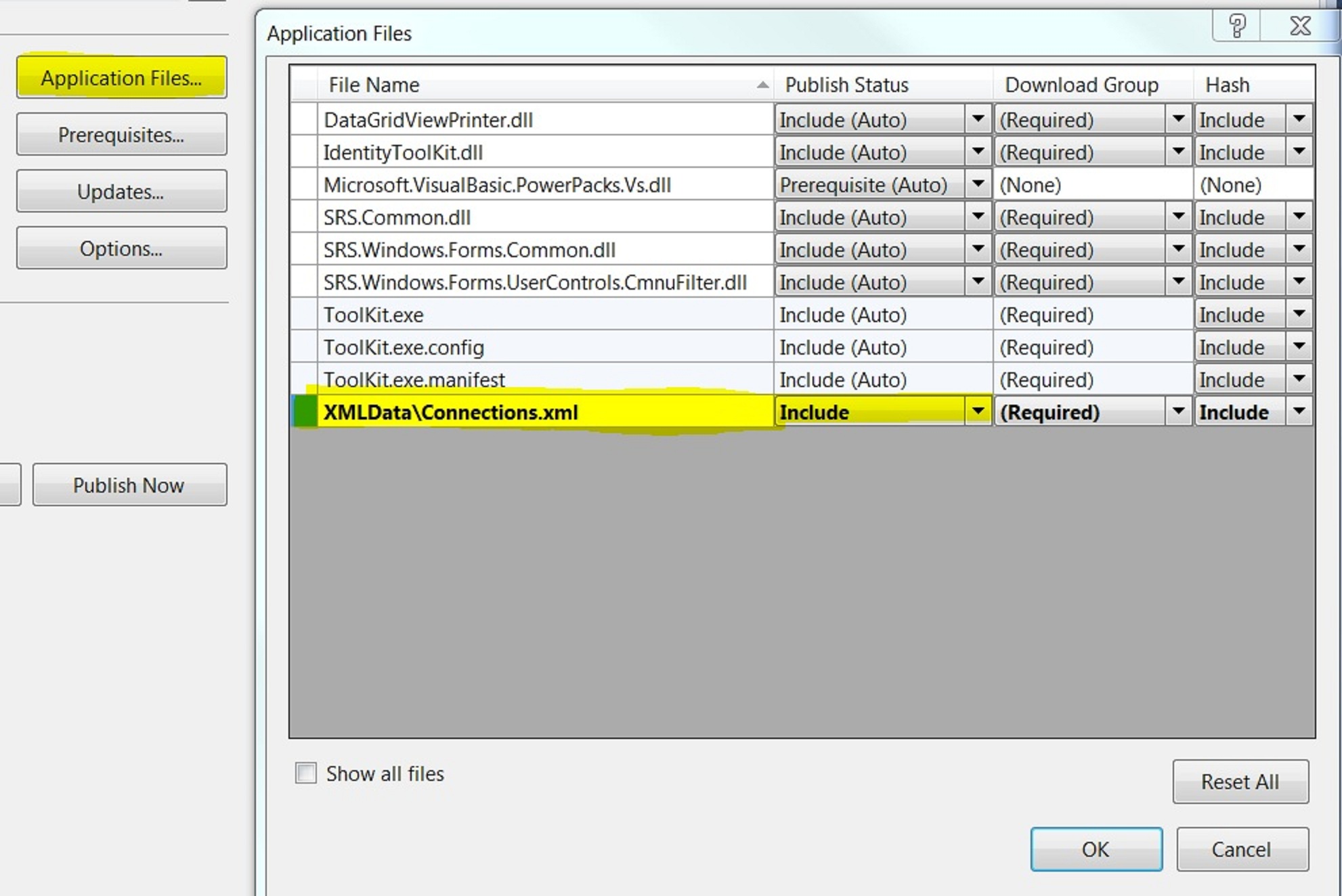
XML. Get from SQL. Dataset.ReadXML(filePath) Publish

How do I get XML data from an SQL Select statement

SELECT [ID],[Name],[Notes],[Example],[DateInput] FROM [SystemDesign].[dbo].[Connections]
FOR XML PATH(‘Connection’), ROOT(‘Connections’)

The output could be copied into a new XML file in Visual Studio

How do I read XML data into a DataSet

Dim filePath = String.Concat(My.Application.Info.DirectoryPath, “\XMLData\Connections.xml”)
Dim filePathSchema = String.Concat(My.Application.Info.DirectoryPath, “\XMLData\Connections.xsd”)
Using ds As New DataSet
ds.ReadXmlSchema(filePathSchema)
ds.ReadXml(filePath)
Me.dsObjectControl1.Connections.Merge(ds.Tables(0))
End Using

How do I distribute and Publish the MyFile.xml and MyFile.xsd

Make sure that on the properties of both these files that:
“Build Action” = “Content”
“Copy to Output Directory” is “Copy if Newer” or “Copy Always”
On Project > Properties > Publish > Application Files > Find <FileName>.xml file and set Publish Status to “Include”

What other considerations are there?

Dataset.ReadXMLSchema(filepath) normally first
Otherwise Dataset.ReadXML will return a table, but the columns are probably of the wrong datatype
So in the above example, the merge will not work because the strongly type dsObjectControl.Connections uses a proper schema.

For the same reason if you hard-code bind the newly created ds.Tables(0) to a bindingsource, this may not work if the schema is important.

How do I get an xsd file?

There is a tool in Visual Studio on Add new item > Data > XML to Schema

How do I validate my xml file against a xsd file?

Possible by adding . See Toolkit.sln. Also links here:
http://msdn.microsoft.com/en-us/library/ms759142(VS.85).aspx
http://msdn.microsoft.com/en-us/library/ms757051(v=VS.85).aspx

How do I get my new dataset to hold the schema from the xml file

TODO currently only by using the Dataset.ReadXMLSchema(filepath) as listed above. It does not get it right on it’s own.

How do I convert my xsd file into a dataset

Was able to do this, mostly by opening it. Also by adding the Custom Tool.

Deleted row information cannot be accessed through the row. Including with Lambda functions.

Error message
Deleted row information cannot be accessed through the row.
This may occur when using Lambda functions and in other scenarios as well.

Problem
Dim dtTotal = dsBusiness1.InvoiceDetail.Where(Function(r1) r1.InvoiceNo = cInvoice.InvoiceNo AndAlso r1.RowState <> DataRowState.Deleted)

Solution 1
Dim dtTotal = dsBusiness1.InvoiceDetail.Where(Function(r1) r1.RowState <> DataRowState.Deleted AndAlso r1.InvoiceNo = cInvoice.InvoiceNo)

Solution 2
Use AcceptChanges on datatable to force deletions to clear

Try

Me.MyBindingSource.RemoveCurrent()
Me.MyBindingSource.EndEdit()
Me.ds1.MyTable.AcceptChanges()

Catch ex As Exception
MessageBox.Show(ex.Message)
End Try

Datatable internal index is corrupted ‘5’ – on Dataset save

See  http://support.microsoft.com/kb/932491

Issue 5: When a Merge operation occurs, the record manager may become corrupted if the target row is in the edit state

I got this when i was repeatedly updating totals in databound text boxes from Detail rows into the Header table on every move or listchanged. Then bindingsource.addnew, then fill in data, then try and save giving error:- Datatable internal index is corrupted ‘5’

Solutions included:

  1. Remove data binding to text boxes. Write these when updating totals.
  2. Write totals to HeaderRow only if saving
  3. Also found that GetTotals was being called 3 times, on list clear, on parent bindingsource move, on fill detail.
    Controlled this better by putting a SuspendRefreshFlag, before LoadDetail, then after load, GetTotal, Then SuspendRefreshFlag = False again.
  4. Also in ListChanged event use the ByVal e As System.ComponentModel.ListChangedEventArgs

If e.ListChangedType <> System.ComponentModel.ListChangedType.Reset Then
   GetSumFromDetail()
End If

Occurrences

  1. First occurrence at first writing of this post
  2. frmInvoiceDetail – Dec 2012
    • was in ListChanged


Dataset TableAdapter CommandTimeout

If get error:
“Timeout expired. The timeout period elapsed prior to completion of the operation or the server is not responding”

Setting the connection string timeout does not work.

Following links led me to my own visual basic translation. I found i had to add the check for the commandCollection Is Nothing
http://www.velocityreviews.com/forums/t123478-how-to-set-commandtimeout-for-getdata-method-of-tableadapter-asp-net-2-0-a.html
http://www.pcreview.co.uk/forums/tableadapter-and-commandtimeout-t2354775.html

Because the DatasetName.Designer.vb is a partial class, it is possible to create a second partial class which will not be overwritten on changes to the dataset. Remember to use

Namespace xxxTableAdapters

    Partial Public Class xxxTableAdapter

        Public WriteOnly Property SetSelectCommandTimeout() As Integer
            Set(ByVal value As Integer)
                If Me._commandCollection Is Nothing Then
                    Me.InitCommandCollection()
                End If
                Me.CommandCollection(0).CommandTimeout = value
                ‘For Each cmd In Me._commandCollection  ‘To do all
                ‘    cmd.CommandTimeout = value
                ‘Next
            End Set
        End Property

    End Class

End Namespace

How do I … work with Guid in ADO.Net?

How do I … work with Guid in ADO.Net?
( in this case to support SQL Server replication using dataset )

26-Dec-2011
Hypothesis: That DataSet could act unaware of replication column (do not import it on datatable creation) (or delete it after). Then use default in SQL Server (newsequentialid())
Experiment: Worked out of the box – straight away

During creation of SQL Replication, SQL Server will add a rowGuid column which is a uniqueidentifier and places a default of (newsequentialid()) onto this column
Insert statements for replication must include all columns, except the rowGuid column.

ERROR
However if you then add a new row to this table in ADO.Net then program will give error message ‘Column rowGuid does not allow nulls’

SOLUTION
[MyDataTable].rowguidColumn.DefaultValue = Guid.NewGuid

EXPLANATION
SQL will have inserted a Unique index on rowGuid. However when the table is dropped onto the dataset the unique key is not there. Therefore although the above default set once will give each new row the same Guid, the ADO.net sees no errors. Because the insert statement does not insert the Guid, SQL does, then ADO.Net immediately returns the correct newly applied Guid from the database. This is because the Dataset insert statement also has a SELECT statement on it to get table updates immediately after the INSERT.

SQL Server Replication

Updating ERROR
Updating columns with the rowguidcol property is not allowed.
The transaction ended in the trigger. The batch has been aborted.

Removed the rowguid column from the dataset update sql and it worked. Found no online instruction for this in short search.

All TableAdapters managed by a TableAdapterManager must use the same connection string

All TableAdapters managed by a TableAdapterManager must use the same connection string

http://social.msdn.microsoft.com/Forums/en/adodotnetdataset/thread/f172a9f6-e59a-49b5-818e-bd86f5a3bfa2

Can happen because one connection string has Persist Security Info=True and one does not
Make sure each connection string is the same.

Cannot bind to the property or column .. on the datasource.

VB.Net Window Forms databinding

Cannot bind to the property or column .. on the datasource.
Parameter name: dataMember

  1. Check to see if you have used the same binding source for two or more combo boxes.
  2. or alternatively because dataMember is not strongly typed, possible that the name of a field has changed in the data set, but not in the form

Parent and Child new row on windows forms details

Problem is that
Me.ParentBindingSource.AddNew
Me.ChildBindingSource.AddNew

then when saving:
Me.ParentBindingSource.EndEdit
will destroy child row.

My workaround is:
Store a variable stating is NewRow and/or child row data IsMissing
Then on SaveData use:
If NewRow OrElse IsChildRowMissing Then
  StoreData
End If
Me.ParentBindingSource.EndEdit
If NewRow OrElse IsChildRowMissing Then
  Using taP as New dsTableAdapters.ParentTableAdapter
     taP.Update(ds)
  End Using
  DisplayStoredData – which includes re-adding child row
End If
Continue with normal save

This link describes problem but is not much help to solution:
http://www.vbdotnetforums.com/database-general-discussion/13058-calling-endedit-causes-datarelations-fail.html

Dataset loses default connection My.MySettings when moved between projects

 
When moving dataset from one project to another, for example to create N-Tier then it may well lose the default connection. It is almost right but loses the My.MySettings bit.
 
Open DS.xsd file in notepad
Locate PropertyReference=”ApplicationSettings.ProjectName.MySettings.GlobalReference.Default.conStr…”
Change to PropertyReference=”ApplicationSettings.ProjectName.My.MySettings.GlobalReference.Default.conStrOperaDataset”