How to use “external” configuration files e.g. SharedApp.config with a test project?

Error:
Test method TestProjectBusiness.dsBusinessHelperTest.FillAdviceNoteTest threw exception:
System.Configuration.ConfigurationErrorsException: Unable to open configSource file ‘SharedApp.config’. (…Visual Studio 2010\Projects\…\TestResults\…\Out\TestProject.DLL.config line 8)

Solution at:
http://stackoverflow.com/questions/152866/how-can-you-use-external-configuration-files-i-e-with-configsource-with-an-m

Quote
“If you edit the test run configuration (by double clicking the .testrunconfig file that gets put into the ‘Solution Items’ solution folder when you add a new unit test), you get a test run configuration dialog. There’s a section there called ‘Deployment’ where you can specifiy files or whole folders from anywhere in the solution that can be copied out with the compiled assemblies at run time to the correct folder.

In this way, I can now actually just define most of my configuration in one set of external .config files and have them automatically copied out at the run of each test.”

My Notes:
This works. You may have to close and re-open the test run – test list editor .vsmdi for the appropriate test-settings to take affect.
Some of the properties associated with the solution could not be read

Visual Studio when opening a solution.
“One or more projects were not loaded correctly”
“Some of the properties associated with the solution could not be read”

Following did not work really, but does discuss the corrupt solution file, which may have a different number of projects to those attached to this solution.
http://blogs.msdn.com/b/rjohri/archive/2010/03/11/some-of-the-properties-associated-with-the-solution-could-not-be-read.aspx

Alternative is to create a new solution and add the projects to it.

Also am finding that Windows 7 machine, moving to XP machine, is making XP machine files read-only. This may be part of the problem.

WPF RichTextBox: How To Load, Edit and Save Rich Text Format

See Ged Mead

http://vbcity.com/blogs/xtab/archive/2010/03/01/wpf-richtextbox-how-to-load-edit-and-save-rich-text-format.aspx

WPF RichTextBox : How to Load and Save Plain Text Content

See Ged Mead

http://vbcity.com/blogs/xtab/archive/2010/02/22/wpf-richtextbox-how-to-load-and-save-plain-text-content.aspx

XML. Get from SQL. Dataset.ReadXML(filePath) Publish

How do I get XML data from an SQL Select statement

SELECT [ID],[Name],[Notes],[Example],[DateInput] FROM [SystemDesign].[dbo].[Connections]
FOR XML PATH(‘Connection’), ROOT(‘Connections’)

The output could be copied into a new XML file in Visual Studio

How do I read XML data into a DataSet

Dim filePath = String.Concat(My.Application.Info.DirectoryPath, “\XMLData\Connections.xml”)
Dim filePathSchema = String.Concat(My.Application.Info.DirectoryPath, “\XMLData\Connections.xsd”)
Using ds As New DataSet
ds.ReadXmlSchema(filePathSchema)
ds.ReadXml(filePath)
Me.dsObjectControl1.Connections.Merge(ds.Tables(0))
End Using

How do I distribute and Publish the MyFile.xml and MyFile.xsd

Make sure that on the properties of both these files that:
“Build Action” = “Content”
“Copy to Output Directory” is “Copy if Newer” or “Copy Always”
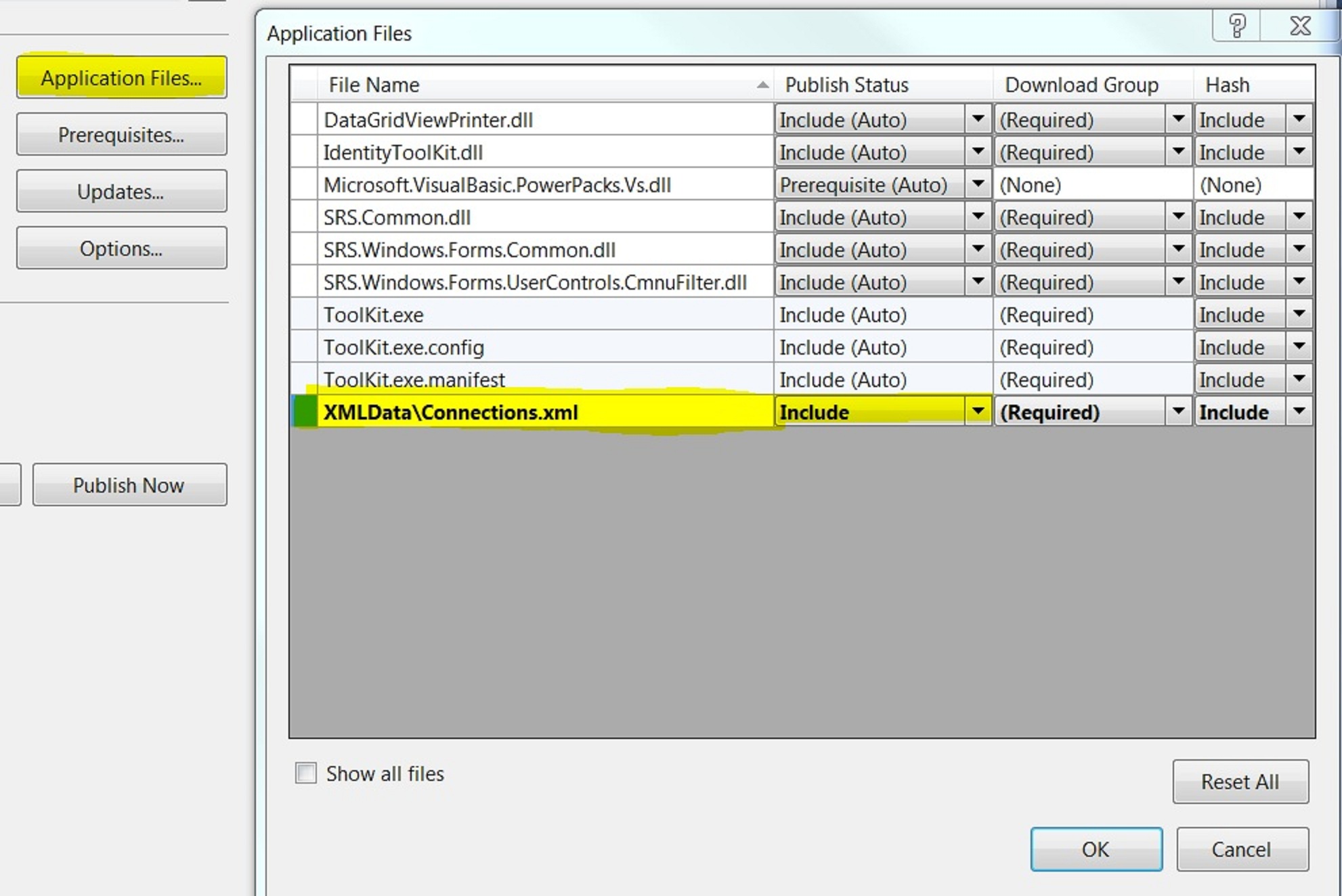
On Project > Properties > Publish > Application Files > Find <FileName>.xml file and set Publish Status to “Include”

What other considerations are there?

Dataset.ReadXMLSchema(filepath) normally first
Otherwise Dataset.ReadXML will return a table, but the columns are probably of the wrong datatype
So in the above example, the merge will not work because the strongly type dsObjectControl.Connections uses a proper schema.

For the same reason if you hard-code bind the newly created ds.Tables(0) to a bindingsource, this may not work if the schema is important.

How do I get an xsd file?

There is a tool in Visual Studio on Add new item > Data > XML to Schema

How do I validate my xml file against a xsd file?

Possible by adding . See Toolkit.sln. Also links here:
http://msdn.microsoft.com/en-us/library/ms759142(VS.85).aspx
http://msdn.microsoft.com/en-us/library/ms757051(v=VS.85).aspx

How do I get my new dataset to hold the schema from the xml file

TODO currently only by using the Dataset.ReadXMLSchema(filepath) as listed above. It does not get it right on it’s own.

How do I convert my xsd file into a dataset

Was able to do this, mostly by opening it. Also by adding the Custom Tool.

“Changes to 64-bit applications is not allowed” when attempting to edit code at run-time

If this is holding you back then try:
> Project Properties > Compile > Advanced Compile Options > Target CPU: change to x86

Set ComboBox to an item when bound to objects

Use Object.Equals.
Then set the combobox selecteditem to a new instance of the object with the required ID or other.
Sample Equals

Public Overrides Function Equals(obj As Object) As Boolean
    If obj Is Nothing Then
        Return False
    End If
    Return CType(obj, Customer).ID = Me.ID
End Function

Deleted row information cannot be accessed through the row. Including with Lambda functions.

Error message
Deleted row information cannot be accessed through the row.
This may occur when using Lambda functions and in other scenarios as well.

Problem
Dim dtTotal = dsBusiness1.InvoiceDetail.Where(Function(r1) r1.InvoiceNo = cInvoice.InvoiceNo AndAlso r1.RowState <> DataRowState.Deleted)

Solution 1
Dim dtTotal = dsBusiness1.InvoiceDetail.Where(Function(r1) r1.RowState <> DataRowState.Deleted AndAlso r1.InvoiceNo = cInvoice.InvoiceNo)

Solution 2
Use AcceptChanges on datatable to force deletions to clear

Try

Me.MyBindingSource.RemoveCurrent()
Me.MyBindingSource.EndEdit()
Me.ds1.MyTable.AcceptChanges()

Catch ex As Exception
MessageBox.Show(ex.Message)
End Try

Datatable internal index is corrupted ‘5’ – on Dataset save

See  http://support.microsoft.com/kb/932491

Issue 5: When a Merge operation occurs, the record manager may become corrupted if the target row is in the edit state

I got this when i was repeatedly updating totals in databound text boxes from Detail rows into the Header table on every move or listchanged. Then bindingsource.addnew, then fill in data, then try and save giving error:- Datatable internal index is corrupted ‘5’

Solutions included:

  1. Remove data binding to text boxes. Write these when updating totals.
  2. Write totals to HeaderRow only if saving
  3. Also found that GetTotals was being called 3 times, on list clear, on parent bindingsource move, on fill detail.
    Controlled this better by putting a SuspendRefreshFlag, before LoadDetail, then after load, GetTotal, Then SuspendRefreshFlag = False again.
  4. Also in ListChanged event use the ByVal e As System.ComponentModel.ListChangedEventArgs

If e.ListChangedType <> System.ComponentModel.ListChangedType.Reset Then
   GetSumFromDetail()
End If

Occurrences

  1. First occurrence at first writing of this post
  2. frmInvoiceDetail – Dec 2012
    • was in ListChanged


Binding a setting to a Property at Design Time. Windows Forms


Window form and control properties may be bound to Application Settings, by expanding the Application Settings at the top of the control properties.
This works fine, for say BackColor. However be warned, there is then a marker by the related bound property. If you then set this manually, this is actually bi-directional and you will change it in the Settings file at the same time, and hence all accross your application, which is probably not your intended action.

See Microsoft Book 70-505 Windows Forms p 587