Transact SQL for disable and enable Trigger
11-Nov-1111 Leave a comment
DISABLE TRIGGER Product.updateProducts ON Product.Products;
UPDATE Product.Products…
ENABLE TRIGGER updateProducts ON Product.Products;
IT and business subjects
11-Nov-1111 Leave a comment
DISABLE TRIGGER Product.updateProducts ON Product.Products;
UPDATE Product.Products…
ENABLE TRIGGER updateProducts ON Product.Products;
04-Jul-1111 Leave a comment
Normal pivot in SQL means pre-defining the pivot column output, unlike Excel which dynamically works out the pivot columns.
A solution to this was found here with thanks to: http://sqlserver-qa.net/blogs/t-sql/archive/2008/08/27/4809.aspx This copied after comments below with my own naming again here.
I wanted to join the data from this dynamic pivot to other data relating to the item and for one parameter (ProductID). I created a stored procedure which created a dynamic SQL including these columns and the parameter and passed this SQL to the generic dbo.uspDynamicPivot.
The PIVOT operator available in SQL Server 2005 is used to generate the Cross-tab results. Consider this example
select * from
(
selectYear(OrderDate)as pivot_col,e.lastname, o.OrderDate FROM northwind..Employees as e
INNERJOIN northwind..Orders as o ON(e.EmployeeID=o.EmployeeID)
) as t
pivot
(
Count(OrderDate)for pivot_col in([1996],[1997])
)as p
which shows total orders of each employees for years 1996 and 1997
What if we want to have this for all the years available in the table
You need to use dynamic sql
This procedure is used to generate Dynamic Pivot results
The approach is very similar to my Dynamic Crosstab with multiple PIVOT Columns blog post
create proceduredbo.uspDynamicPivot
(
@select varchar(2000),
@PivotCol varchar(100),
@Summaries varchar(100)
)as
declare
@pivot varchar(max), @sql varchar(max)
select @select =replace(@select,‘select ‘,‘select ‘+@PivotCol+‘ as pivot_col,’)
createtable #pivot_columns (pivot_column varchar(100))
Select
@sql=‘select distinct pivot_col from (‘+@select+‘) as t’
insert
into #pivot_columns
exec(@sql)
select
@pivot=coalesce(@pivot+‘,’,”)+‘[‘+pivot_column+‘]’from #pivot_columns
select
@sql=
‘
select * from
(
‘+@select+‘
) as t
pivot
(
‘+@Summaries+‘ for pivot_col in (‘+@pivot+‘)
) as p
‘exec(@sql)
Purpose : Find total sales made by each employee for each yearUsage :
EXEC
dynamic_pivot
‘SELECT e.lastname, o.OrderDate FROM northwind..Employees as e
INNER JOIN northwind..Orders as o ON (e.EmployeeID=o.EmployeeID) ‘,
‘Year(OrderDate)’,
‘Count(OrderDate)’
Purpose : Find total sales made by each company for each product
Usage :
EXEC
dynamic_pivot
‘SELECT s.companyname,coalesce(od.unitprice*od.quantity ,0) as total_cost FROM northwind..products as p
inner join northwind..[order details] as od on p.productid=od.productid
inner join northwind..suppliers as s on p.supplierid=s.supplierid’,
‘productname’,
‘sum(total_cost)’
03-May-1111 Leave a comment
SELECT [ID],[Name],[Notes],[Example],[DateInput] FROM [SystemDesign].[dbo].[Connections]
FOR XML PATH(‘Connection’), ROOT(‘Connections’)
The output could be copied into a new XML file in Visual Studio
Dim filePath = String.Concat(My.Application.Info.DirectoryPath, “\XMLData\Connections.xml”)
Dim filePathSchema = String.Concat(My.Application.Info.DirectoryPath, “\XMLData\Connections.xsd”)
Using ds As New DataSet
ds.ReadXmlSchema(filePathSchema)
ds.ReadXml(filePath)
Me.dsObjectControl1.Connections.Merge(ds.Tables(0))
End Using
Make sure that on the properties of both these files that:
“Build Action” = “Content”
“Copy to Output Directory” is “Copy if Newer” or “Copy Always”
On Project > Properties > Publish > Application Files > Find <FileName>.xml file and set Publish Status to “Include”
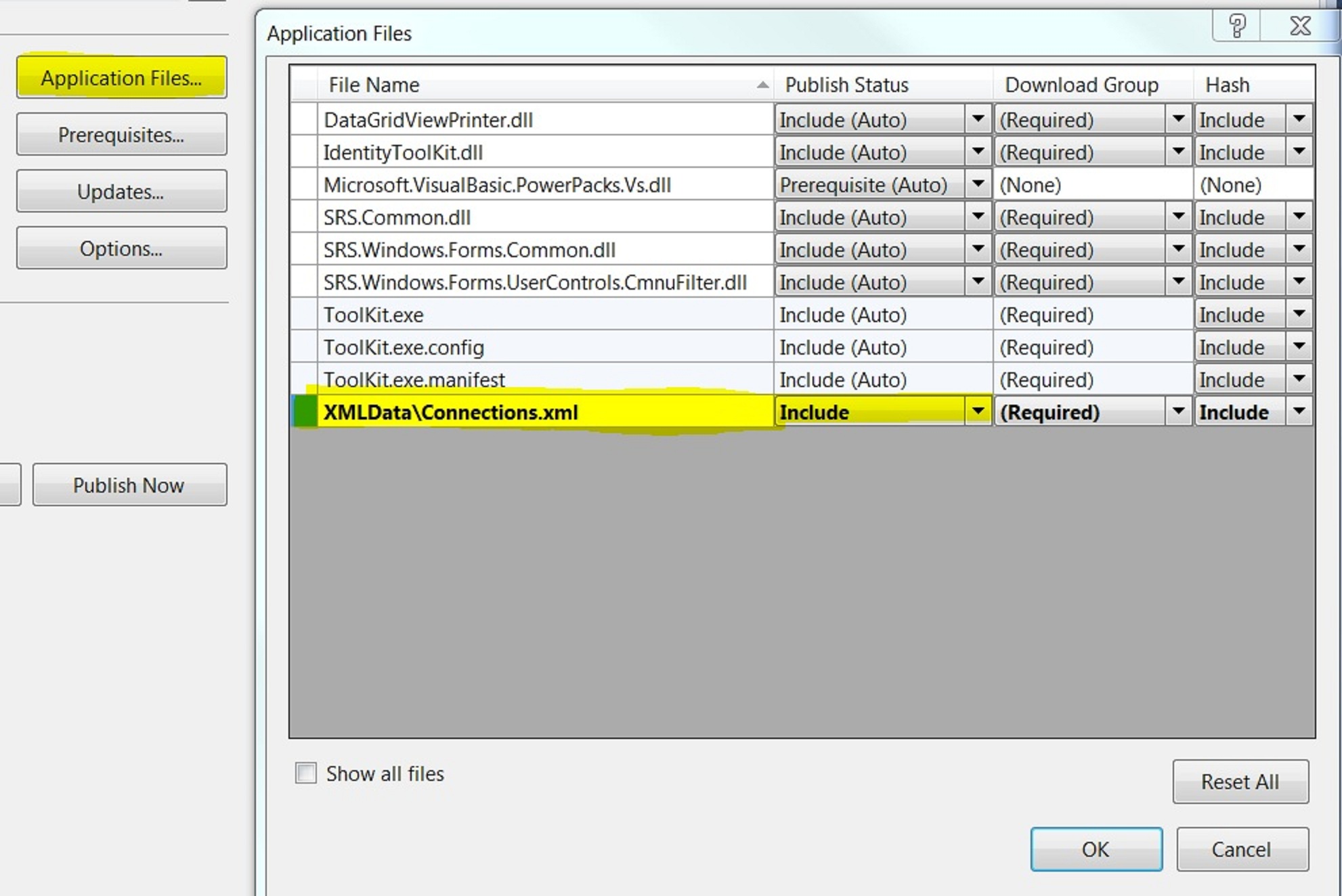
Dataset.ReadXMLSchema(filepath) normally first
Otherwise Dataset.ReadXML will return a table, but the columns are probably of the wrong datatype
So in the above example, the merge will not work because the strongly type dsObjectControl.Connections uses a proper schema.
For the same reason if you hard-code bind the newly created ds.Tables(0) to a bindingsource, this may not work if the schema is important.
There is a tool in Visual Studio on Add new item > Data > XML to Schema
Possible by adding . See Toolkit.sln. Also links here:
http://msdn.microsoft.com/en-us/library/ms759142(VS.85).aspx
http://msdn.microsoft.com/en-us/library/ms757051(v=VS.85).aspx
TODO currently only by using the Dataset.ReadXMLSchema(filepath) as listed above. It does not get it right on it’s own.
Was able to do this, mostly by opening it. Also by adding the Custom Tool.
26-Mar-1111 Leave a comment
sp_defaultdb ‘login’, ‘master’
SQL Server 2005. If you detach the default database from the server, then you may experience unable to login errors, for instance on attach.
Use the above to change the default database and you will then be able to login.
For simple connection > Options > Connection Properties > Connect to database > Change from <default> to another still attached database or master
 Stephen Shakespeare