Microsoft Visual Studio LightSwitch – Installation

There is a lot of web talk on problems with existing SQL installations before installing LightSwitch

  1. LightSwitch 2011 requires SQL Server Express to be installed. It is looking for SQLEXPRES instance.
  2. If you already have SQL Developer edition you may have a problem. I tried to trick it by adding an instance to SQL Developer named SQLEXPRESS. This got past the LightSwitch install.
  3. However still could not use the program because it also requires User Instances, which are not possible in Developer. So Removed my SQLEXPRESS instance. To do this > Programs and Features > Microsoft SQL Server 2008 R2 (64-bit) then Remove. Don’t panic it asks if you want to uninstall an instance, so you can leave previous instances on there.
  4. Then installed SQLExpress side-by-side with my developer edition. All OK
  5. LightSwitch 2011 good to go!

SQL Server backup notes

Back Up Database Task

Several points of issue with this routine. It is not as obvious as it may seem:

  • Backup set will expire After n days or On a date – when using a backup device
    • Although the backup expires it does automatically get overriden and space released. It stays there so the backup device will continue to grow and potentially fill-up the disk. Disappointing.
  • If backup file exist: Append or Overwrite.
    • Append is clear. Overwrite is not so clear. As far as I can tell it will clear out any-all existing backups in the device. As opposed to clearing out expired backups.

For a long time I had not used the backup set expire. I have been using the expire for about 3 months with 100 days. I was expecting it to start clearing out the old backups, so keeping the backup device file size roughly static. However this did not happen and the disk started to fill up.

So in conclusion I will revert to my previous method of renaming the backup device with a date on the end yyyy-mm-dd which means the backup task then recreates it. Then after a period of time move the old backup devices off to a separate NSA drive.

Grandfather – Father – Son
Now do backups several times a day, but now also do a monthly backup with the intention of eventually deleting daily backups.

Database Naming Convention


For table identity column generally use ID not <TableName>ID unless it is clear what an identity column should be e.g. WO for Work Order
My preference is ID not <TableName>ID because:

  1. Less verbose. If table name itself is long then using <TableName>ID will be wordy and is likely to extend the number of lines in any Transact SQL
  2. ID works
  3. In code you know that the ID column should exist

SSRS Configuration – “user … does not have required permissions. Verify that .. and … UAC …

SOLVED

User ‘<server>\<username>’ does not have required permissions. Verify that sufficient permissions have been granted and Windows User Account Control (UAC) restrictions have been addressed.

“To get this resolved you need to start you Internet Explorer as Administrator -> Run as Administrator then open the url http://<Server name>/Reports this will take you to the “SQL Server Reporting Services” Home page
Click on the “Folder Settings” button.
Click on the “New Role Assignment” button.
Add the Group or user name: DOMAIN\USER_NAME, and permissions you have logged in as.
Click on Ok button.
This should resolve the issue.”

SQL Linked server – Change of password

TODO confirm this works then mark as Solved

A linked server using VFPOLEDB has worked for sometime here. Then the server related user password was changed and it all stopped working. Perhaps consider following page

http://msdn.microsoft.com/en-us/library/ms175537.aspx

“Linked server login mappings can be added by using sp_addlinkedsrvlogin and removed by using sp_droplinkedsrvlogin. A linked server login mapping establishes a remote login and remote password for a specified linked server and local login. When SQL Server connects to a linked server to execute a distributed query or a stored procedure, SQL Server looks for any login mappings for the current login that is executing the query or the procedure. If there is a login mapping, SQL Server sends the corresponding remote login and password when it connects to the linked server.”

Transact SQL: Dynamic Pivot

Normal pivot in SQL means pre-defining the pivot column output, unlike Excel which dynamically works out the pivot columns.
A solution to this was found here with thanks to:  http://sqlserver-qa.net/blogs/t-sql/archive/2008/08/27/4809.aspx This copied after comments below with my own naming again here.

Comments

I wanted to join the data from this dynamic pivot to other data relating to the item and for one parameter (ProductID). I created a stored procedure which created a dynamic SQL including these columns and the parameter and passed this SQL to the generic dbo.uspDynamicPivot.

Dynamic PIVOT in SQL Server 2005

The PIVOT operator available in SQL Server 2005 is used to generate the Cross-tab results. Consider this example

select * from
(
    selectYear(OrderDate)as pivot_col,e.lastname, o.OrderDate FROM northwind..Employees as e
    INNERJOIN northwind..Orders as o ON(e.EmployeeID=o.EmployeeID)
) as t
pivot
(
   
Count(OrderDate)for pivot_col in([1996],[1997])
)
as p

which shows total orders of each employees for years 1996 and 1997

What if we want to have this for all the years available in the table
You need to use dynamic sql

This procedure is used to generate Dynamic Pivot results
The approach is very similar to my Dynamic Crosstab with multiple PIVOT Columns blog post

create proceduredbo.uspDynamicPivot
(
@select varchar(2000),
@PivotCol varchar(100),
@Summaries
varchar(100)
)
as

declare

@pivot varchar(max), @sql varchar(max)
select @select =replace(@select,‘select ‘,‘select ‘+@PivotCol+‘ as pivot_col,’)
 

createtable #pivot_columns (pivot_column varchar(100))

Select

@sql=‘select distinct pivot_col from (‘+@select+‘) as t’

insert

into #pivot_columns
exec(@sql)

select

@pivot=coalesce(@pivot+‘,’,)+‘[‘+pivot_column+‘]’from #pivot_columns

select

@sql=

    select * from 
    (
        ‘
+@select+
    ) as t
pivot 
    (
        ‘
+@Summaries+‘ for pivot_col in (‘+@pivot+‘)
    ) as p
exec(@sql)
 Purpose : Find total sales made by each employee for each year
Usage :

EXEC

dynamic_pivot
‘SELECT e.lastname, o.OrderDate FROM northwind..Employees as e
INNER JOIN northwind..Orders as o ON (e.EmployeeID=o.EmployeeID) ‘
,
‘Year(OrderDate)’,
‘Count(OrderDate)’

Purpose : Find total sales made by each company for each product

Usage :

EXEC

dynamic_pivot
‘SELECT s.companyname,coalesce(od.unitprice*od.quantity ,0) as total_cost FROM northwind..products as p
inner join northwind..[order details] as od on p.productid=od.productid
inner join northwind..suppliers as s on p.supplierid=s.supplierid’
,
‘productname’,

‘sum(total_cost)’

Published Wednesday, August 27, 2008 12:58 PM by Madhivanan
How to remove serer name items from history of sql server management studio


http://stackoverflow.com/questions/1059105/how-to-remove-server-name-items-from-history-of-sql-server-management-studio

For SQL 2005, delete the file:

C:\Documents and Settings\<USER>\Application Data\Microsoft\Microsoft SQL Server\90\Tools\Shell\mru.dat

For SQL 2008, the file location, format and name changed:

C:\Documents and Settings\<USER>\Application Data\Microsoft\Microsoft SQL Server\100\Tools\Shell\SqlStudio.bin

How to clear the list:

  1. Shut down all instances of SSMS
  2. Delete/Rename the file
  3. Open SSMS

This request is registered on Microsoft Connect

https://connect.microsoft.com/SQLServer/feedback/details/424800/ssms-expose-connect-to-server-mru-list-to-users


Visual Studio Report Designer: Using External Image

Add a table > Link table to a datasource
> Put an image in a cell.
> Image > Properties >
    > “Select the Image Source” to “External”
    > “Use this image” > set to a data source field
> Your Form > Report Viewer > Local Report >Enable External Images > “True”

Example of file names passed:
file:\\ServerName\Directory\SubDirectory\Filename.jpg

see
http://en.wikipedia.org/wiki/File_URI_scheme

but beware of “Percent-encoding” special characters, which include # and others

http://en.wikipedia.org/wiki/Percent-encoding

so ABC#123.jpg will become ABC%23123.jpg

XML. Get from SQL. Dataset.ReadXML(filePath) Publish

How do I get XML data from an SQL Select statement

SELECT [ID],[Name],[Notes],[Example],[DateInput] FROM [SystemDesign].[dbo].[Connections]
FOR XML PATH(‘Connection’), ROOT(‘Connections’)

The output could be copied into a new XML file in Visual Studio

How do I read XML data into a DataSet

Dim filePath = String.Concat(My.Application.Info.DirectoryPath, “\XMLData\Connections.xml”)
Dim filePathSchema = String.Concat(My.Application.Info.DirectoryPath, “\XMLData\Connections.xsd”)
Using ds As New DataSet
ds.ReadXmlSchema(filePathSchema)
ds.ReadXml(filePath)
Me.dsObjectControl1.Connections.Merge(ds.Tables(0))
End Using

How do I distribute and Publish the MyFile.xml and MyFile.xsd

Make sure that on the properties of both these files that:
“Build Action” = “Content”
“Copy to Output Directory” is “Copy if Newer” or “Copy Always”
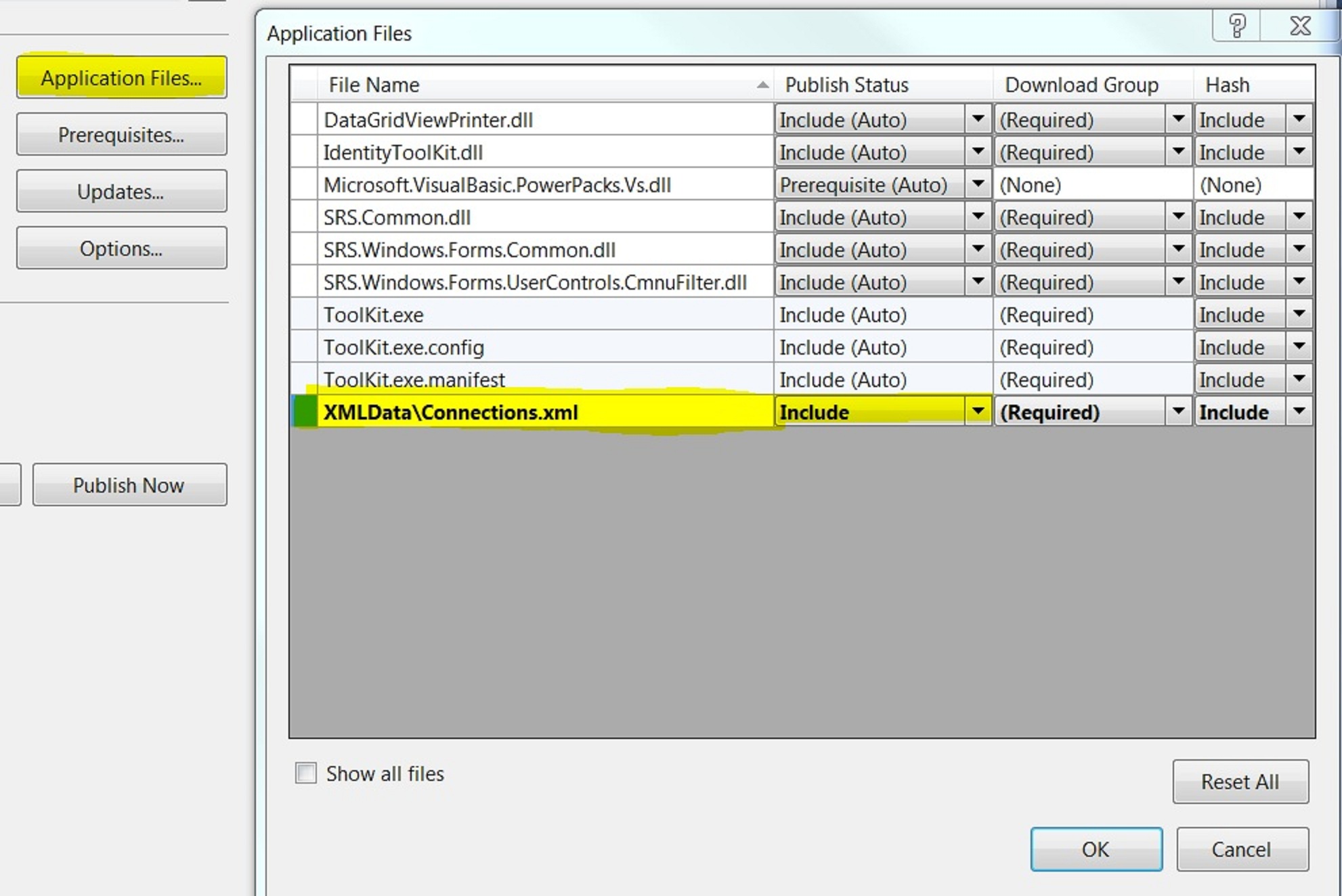
On Project > Properties > Publish > Application Files > Find <FileName>.xml file and set Publish Status to “Include”

What other considerations are there?

Dataset.ReadXMLSchema(filepath) normally first
Otherwise Dataset.ReadXML will return a table, but the columns are probably of the wrong datatype
So in the above example, the merge will not work because the strongly type dsObjectControl.Connections uses a proper schema.

For the same reason if you hard-code bind the newly created ds.Tables(0) to a bindingsource, this may not work if the schema is important.

How do I get an xsd file?

There is a tool in Visual Studio on Add new item > Data > XML to Schema

How do I validate my xml file against a xsd file?

Possible by adding . See Toolkit.sln. Also links here:
http://msdn.microsoft.com/en-us/library/ms759142(VS.85).aspx
http://msdn.microsoft.com/en-us/library/ms757051(v=VS.85).aspx

How do I get my new dataset to hold the schema from the xml file

TODO currently only by using the Dataset.ReadXMLSchema(filepath) as listed above. It does not get it right on it’s own.

How do I convert my xsd file into a dataset

Was able to do this, mostly by opening it. Also by adding the Custom Tool.

Useful Transact SQL sp procedures

sp_defaultdb ‘login’, ‘master’
SQL Server 2005. If you detach the default database from the server, then you may experience unable to login errors, for instance on attach.
Use the above to change the default database and you will then be able to login.
For simple connection > Options > Connection Properties > Connect to database > Change from <default> to another still attached database or master