SQL Server Agent Job Verbose Logging

Please see useful page:

https://www.mssqltips.com/sqlservertip/1411/verbose-sql-server-agent-logging/

  1. In Job Step – Advanced – Output file
  2. Likely strategy is that on first step do not tick “Append output to existing file”
  3. On subsequent steps tick this and then you will get the full output of the series


Bug: Source not found, but some or all event logs could not be searched.

Bug:

The source was not found, but some or all event logs could not be searched. To create the source, you need permission to read all event logs to make sure that the new source name is unique. In accessible logs:Security

This can occur if a .Net application attempts to create the source at runtime, but not as an administrator. It is better to perhaps create the source ahead of time as an administrator in regedit, then just use the source in the application.

Private _eventLog As New EventLog(“Application”)
‘EventLog.CreateEventSource(SourceName, LogName, MachineName)

In registry at:
HKEY_LOCAL_MACHINE\SYSTEM\CurrentControlSet\Services\EventLog\Application\
Add permission to Authenticated Users = Full Control

Or add to the specific key.

With thanks to:
https://sandroaspbiztalkblog.wordpress.com/2012/02/16/the-source-was-not-found-but-some-or-all-event-logs-could-not-be-searched-inaccessible-logs-security/


How to keep the task bar visible when using a maximised RDP client

I use RDP a lot now, but would like to be able to see my own PC’s task bar, for instance Outlook may show messages.
It is possible, with thanks to:
http://notworthrepeating.blogspot.co.uk/2012/03/maximizing-remote-desktop-client.html

So:

  1. Edit your .RDP file using Remote Desktop Client, making sure the “Display” tab is configured for “Full Screen”, and then “Save” the .RDP file again (this bakes your local resolution into the file, which is important)
  2. Edit the .rdp in notepad:
    1. screen mode id:i:2  – change this line to the following, to use windowed mode instead of fullscreen
      screen mode id:i:1
    2. Add this line to the file if it doesn’t exist already:
      smart sizing:i:1
    3. Change nothing about (but take notice of) two lines that talk about “desktopwidth” and “desktopheight”
  3. Save and close the .RDP file

Thanks.


Calling a WCF service using SOAP in unit test or with VB Script on a classic ASP page

I created a WCF service in .Net and this was fine for .Net customers who use the Add Service Reference wizard easily enough.
However one customer was on classic ASP and he found it difficult to connect. So when we had succeeded together it was worth writing down. This is the result.
Please ignore the property naming. I don’t use strPropertyName. This isn’t working code, just an idea of what is required.

Solved.

Tips:

  • Inspect the .wsdl file
  • Note the soapAction setting
  • Note the namespace. The WCF namespace will include the interface name

Unit test written in VB.Net for SOAP

Public Sub SOAPClientHelloWorldTestMethod()

strURLSubFolder = “ServiceName.svc”
strInterfaceName = “IServiceName”
strFunction = “HelloWorldMethod”
Dim parameter1 = “parameter1”

strRequest2FunctionNameOpen = “&lt ns1:HelloWorldMethod &gt”
strRequest3Parameters = “&lt” + parameter1Value + “&gt”
strRequest4FunctionNameClose += “&lt ns1:HelloWorldMethod &gt”

CallSOAP()

End Sub

Then the SOAP call method

Private Sub CallSOAP()

‘URL to SOAP namespace and connection URL
Dim strURLBase = “http://serviceaddress.net/”
Dim strURL = strURLBase + strURLSubFolder
Dim strNamespace = “http://tempuri.org/”

strRequest1SOAPPart1 = “<?xml version=””1.0″” encoding=””UTF-8″”?>” & _

“<SOAP-ENV:Envelope ” & _

“xmlns:SOAP-ENV=””http://schemas.xmlsoap.org/soap/envelope/”&#8221; ” & _

“xmlns:ns1=””” & strNamespace & “””>” & _

“<SOAP-ENV:Body>”

strRequest5SOAPEnd = “</SOAP-ENV:Body></SOAP-ENV:Envelope>”

Dim strRequest = strRequest1SOAPPart1 + strRequest2FunctionNameOpen + strRequest3Parameters + strRequest4FunctionNameClose + strRequest5SOAPEnd
TestContext.WriteLine(“URL = ” + strURL)
TestContext.WriteLine(“Request = ” + strRequest)
Dim soapAction As String
soapAction = strNamespace & strInterfaceName & “/” & strFunction
TestContext.WriteLine(“SOAPAction = ” + soapAction)

Dim objectName As String
‘objectName = “Msxml2.XMLHTTP.3.0”
‘objectName = “MSXML2.DOMDocument.6.0”
objectName = “MSXML2.ServerXMLHTTP”

Dim soap_request As Object
soap_request = CreateObject(objectName)

Dim contentType As String
contentType = “text/xml; charset=utf-8”
‘contentType = “application/x-www-form-urlencoded”

soap_request.open(“POST”, strURL, False)
soap_request.setRequestHeader(“Content-Type”, contentType)
soap_request.setRequestHeader(“Content-Length”, Len(strRequest))
soap_request.setRequestHeader(“SOAPAction”, soapAction)

‘send the request and capture the result
soap_request.send(strRequest)
Dim strResult = soap_request.responseText
soap_request = Nothing

‘display the XML
‘response.write (strResult)
‘TestContext.WriteLine(strResult)
TestContext.WriteLine(“”)
Dim xml = XDocument.Parse(strResult)
TestContext.WriteLine(xml.ToString())

End Sub

Classic ASP

Title
<%
Dim strRequest, strResult, strElement, strURL, strNamespace,interfacename,soap_request,parameter1

‘ Define services
strURL = “http://serviceaddress.svc&#8221; ‘ Service URL
strNamespace = “http://tempuri.org/&#8221; ‘ Name space
interfacename=”IServiceName/” ‘ interface name
strElement = “GetMethod” ‘ Element

set soap_request = Server.CreateObject(“Msxml2.XMLHTTP.3.0″)
strRequest =”<?xml version=””1.0″” encoding=””UTF-8″”?>”

strRequest=strRequest& “<SOAP-ENV:Envelope xmlns:SOAP-ENV=””http://schemas.xmlsoap.org/soap/envelope/”&#8221; xmlns:ns1=”””&strNamespace&”””>”

strRequest=strRequest& “<SOAP-ENV:Body>”

strRequest=strRequest& “<ns1:HelloWorldMethod>”

strRequest=strRequest& “<ns1:parameter1>”&soap_user&”</ns1:parameter1>”

strRequest=strRequest& “</ns1:HelloWorldMethod>”

strRequest=strRequest& “</SOAP-ENV:Body>”

strRequest=strRequest& “</SOAP-ENV:Envelope>”

soap_request.open “post”, “”&strURL&””, False
soap_request.setRequestHeader “Content-Type”, “text/xml; charset=utf-8”
soap_request.setRequestHeader “SOAPAction”,strNamespace&interfacename&strElement
soap_request.setRequestHeader “Content-Length”,Len(strRequest)

Call soap_request.send(strRequest) ‘ Send the soap request and capture the result
strResult = soap_request.responseText

‘display the XML
if strResult”” then
Set ResponseXML = Nothing
end if
Set soap_request = Nothing

end if

%>
Device and Resource Redirection

https://technet.microsoft.com/en-us/library/cc725887(v=WS.10).aspx

Audio redirection

  1. Run
  2. Type “group” to open Edit group policy
  3. Local computer policy
  4. Computer configuration
  5. Administrative Templates
  6. Windows Components
  7. Remote Desktop Services
  8. Remote Desktop Session Host
  9. Device and Resource Redirection
  10. Allow Audio and video playback redirection
  11. Change from Not Configured to Enabled.


How to reinstate Contact Linking in Outlook 2013

For Outlook 2007 and 2010 there is an Option > Contacts > Linking > Show contacts linked to the current item

This has been removed in Outlook 2013, apparently because they have a new feature of Links when you are on People and the current view is People and then look at details. I don’t use that but and tend to use the List view which does not have the links. Also I have historic links, so wanted to reinstate links. Thanks to:

http://www.slipstick.com/outlook/2013/show-contact-linking-fields-in-outlook-2013/

Which I found via

Tip 375: Outlook 2007 (and 2010): Contact Linking

So steps copied from first of these are:

  1. Regedit
  2. HKEY_CURRENT_USER\Software\Microsoft\Office\15.0\Outlook\Preferences
  3. Add DWORD: ShowContactFieldObsolete
  4. Set to 1

That page also referred to a Group Policy registry setting. I did not have that on my machine, did not create it and found that the links were there anyway

To remove:

Set to 0, or remove the Key

Solved.


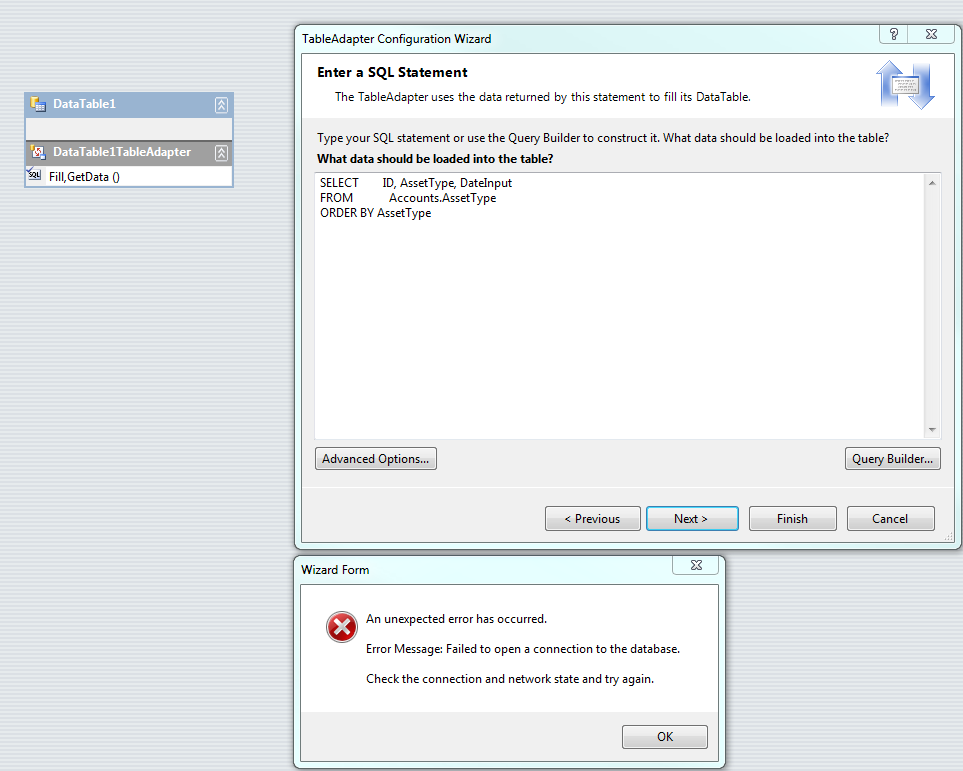
Dataset Error: Failed to open a connection to the database – Synonym error

Dataset has been in production use for a long time. I use EF a lot now, but these still need maintenance and modifications for user requests. Error message was:

Wizard form
An unexpected error has occurred.
Error Message: Failed to open a connection to the database
Check the connection and network state and try again

Datasets will not connect Synonym

This was on a remote server so I thought there may be a timeout issue. However a search and thanks to:

https://social.msdn.microsoft.com/Forums/en-US/33575eae-24bd-470b-b93e-2083af49cfe8/unable-to-add-new-query-in-tableadapter-query-configuration-wizard?forum=adodotnetdataset

revealed that there may be a bad synonym in the database. The writer of that post used Activity Monitor, but SQL Profiler might also find that there was a wait resource of ExternalResource.

Although I did not check the Activity Monitor, I did check my synonyms and they were pointing at an old server. Repaired them to point at a correct location and the dataset issue has gone.

Solved.


Arguments with regard to SpareField1 or specific schema

Because each new feature or property addition requires database changes there is the idea that instead you hold data in fields such as SpareText1, SpareInt1 etc. and this post discusses the relative merits of this and its alternatives. Another place this may be used is to create a common Lookup Field table.

It is my opinion that this should normally be avoided and instead specific schema is used.

Advantages of specific schema

  1. Data type integrity
  2. Required and non-required control by product (Null or Non-Null)
  3. Strongly typed code
  4. Reporting is easier
  5. Discoverability is easier – stay in context
  6. For lookup tables, you will gain referential integrity, and in any case it is possible and not too difficult to create abstract data update forms which may update any of these with data-driven addition of which tables to edit.

Disadvantages of specific schema

  1. You have to change the schema for each change
  2. If you have multiple client databases you may need to change several. If you have many this may be difficult

Mitigations to disadvantages of specific schema

  1. Learn and use simpler design techniques to speed up development. E.g. Entity Framework, code generation
  2. Write forms which may edit any tables. For instance for Lookup tables

Disadvantages of SpareField1

  1. You have to keep a record of what each Spare Field represents. Control and communication of that is difficult, control of a specific, e.g. Length field is not necessary because it says what it is
  2. That may get confusing, or there is a danger that Spare Field may be used in different ways by different people. So in the end it is more complex

Data type integrity

If you have a decimal with precision 4 and scale 2, i.e. 2 dp, max 99.99, then this controls the data. A SpareDecimal1 may have any data type definition, probably too large so as to cope with the general case, and as such bad data may appear, so for instance if you know length is always less than 100 units, then a data entry of 101 is bad data.

Also data type integrity would include Null control

Why use Entity Framework – Justifications

Learning EF takes a lot of time, changing code to use EF is risky, so what are the justifications for considering this.

  1. Entity Framework is listed in NuGet as Microsoft’s recommended data access technology.
  2. You need a lot less code to get and fill objects and reduces the amount of code that you need to write
  3. Closer to OO
  4. It appears to be here to stay
  5. It keeps getting better
  6. Data sets are not being developed
  7. Works well with WPF
  8. You will learn and get better at it in time


How to change Entity Framework context db model cache at runtime

I have two customer database tables, but want to use the same model and context, just be able to determine at runtime if i want to load from the live or the prospect customer table. The problem is that a context OnModelCreating runs only once by default, so you can’t leave parameters there to switch for you. One solution was to copy the context, but I found I needed a bit too much extra code in the usage to determine which to use. To understand a solution it is worth using the Visual Studio Object Browser DbContext remarks. “The protected OnModelCreating method can be overridden to tweak this model. More control over the model used for the Model First approach can be obtained by creating a System.Data.Entity.Infrastructure.DbCompiledModel explicitly from a System.Data.Entity.DbModelBuilder and passing this model to one of the DbContext constructors.” So you can create a DbCompliedModel (System.Data.Entity.Infrastructure) and store it if you may switch back to it, then use it to create an instance of your context. This can be done on the context using Shared / Static factory method.

    Public Class CustomerContext
        Inherits DbContext

        Property Customers() As DbSet(Of Customer)

        Private Shared dbCompiledModelLive As DbCompiledModel
        Private Shared dbCompiledModelProspect As DbCompiledModel

        Private Sub New(connection As DbConnection, model As DbCompiledModel)
            MyBase.New(connection, model, True)
        End Sub

        Shared Function CreateCustomerContext(LiveCustomer As Boolean) As CustomerContext

            Dim conStr = ConfigurationManager.ConnectionStrings("BusinessEntities").ConnectionString
            Dim DbConnection As New SqlConnection(conStr)
            If LiveCustomer Then
                If dbCompiledModelLive IsNot Nothing Then
                    Return New CustomerContext(DbConnection, dbCompiledModelLive)
                End If
            Else
                If dbCompiledModelProspect IsNot Nothing Then
                    Return New CustomerContext(DbConnection, dbCompiledModelProspect)
                End If
            End If

            Dim modelBuilder As New DbModelBuilder
            CustomerMap.LiveCustomerFlag1 = LiveCustomer
            modelBuilder.Configurations.Add(New CustomerMap)
            Dim model = modelBuilder.Build(DbConnection)

            If LiveCustomer Then
                dbCompiledModelLive = model.Compile
                Return New CustomerContext(DbConnection, dbCompiledModelLive)
            End If
            dbCompiledModelProspect = model.Compile
            Return New CustomerContext(DbConnection, dbCompiledModelProspect)

        End Function
    End Class

This all works

    <TestMethod()> _
    Public Sub CustomersTest()

        Dim targetLive = CustomerContext.CreateCustomerContext(True)
        Dim actual As DbSet(Of Customer) = targetLive.Customers
        Debug.Print("Live Customers")
        PrintResult(actual)
        Assert.IsTrue(actual.Count > 2)

        Dim targetProspect = CustomerContext.CreateCustomerContext(False)
        actual = targetProspect.Customers
        Debug.Print("")
        Debug.Print("Prospect Customers")
        PrintResult(actual)
        Assert.AreEqual(0, actual.Count)

        actual = targetLive.Customers
        Debug.Print("")
        Debug.Print("Live Customers")
        PrintResult(actual)
        Assert.IsTrue(actual.Count > 2)

        targetLive = CustomerContext.CreateCustomerContext(True)
        actual = targetLive.Customers
        Debug.Print("")
        Debug.Print("Live Customers")
        PrintResult(actual)
        Assert.IsTrue(actual.Count > 2)

    End Sub

    Private Sub PrintResult(actual As DbSet(Of Customer))
        For Each item As Customer In actual
            Debug.Print(String.Concat(item.ID, vbTab, item.Customer1))
        Next
    End Sub

Could be useful With thanks also to: http://romiller.com/2011/05/23/ef-4-1-multi-tenant-with-code-first/